
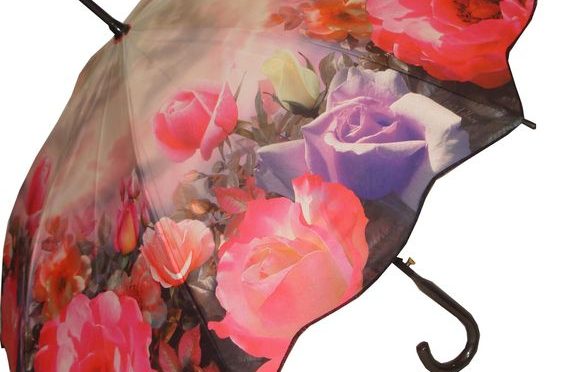
Traditional Screen Printing cannot do this. Enter Digital Printing (Dye Sublimation).
This isn’t just “printing”; it’s chemistry. It allows us to turn a white piece of fabric into a vibrant canvas with unlimited colors. Here is a look inside our digital production line.
Table of Contents
1. The Technology: What is Dye Sublimation? 🧪
Unlike Screen Printing, which puts a layer of ink on top of the fabric, Dye Sublimation fuses the ink into the fabric.
The Science (Simplified):
- We print your artwork onto special Transfer Paper.
- We place the paper against white Pongee fabric.
- We apply heat (over 200°C).
- The Magic: At this temperature, the ink turns into Gas (Sublimation) and penetrates the fabric fibers. When it cools, the color is permanently locked inside.
2. Why Choose Digital Printing? (The Benefits)
If you have a complex design, this is your only option. Here is why:
- Zero “Hand Feel”: Because the ink penetrates the fiber, the fabric stays soft. You can’t feel the print. Screen printing, by contrast, feels like a plastic sticker.
- Unlimited Colors: You don’t pay per color. You can print a photo with 10 million shades for the same price.
- Permanent Vibrancy: The image will never crack, peel, or fade. It lasts as long as the fabric itself.
3. The “Justin” Standard: Solving the Alignment Problem
Many buyers complain that digital print umbrellas have misaligned patterns at the seams. This happens when factories print on a big roll of fabric first, and then cut it.
The HF Umbrella Solution:
- For premium orders, we use “Piece Printing”. We cut the triangular fabric panels first, and then print on each triangle individually.
- This allows us to ensure the pattern flows perfectly from one panel to the next, creating a seamless 360-degree image.
4. Comparison: Digital vs. Screen Printing
Not sure which one you need? Check this table:
| Feature | Digital Printing (Sublimation) | Screen Printing |
|---|---|---|
| Best For | Photos, Gradients, Complex Art | Simple Logos, Text |
| Color Limit | Unlimited | Usually 1-4 colors |
| Durability | Permanent (Never peels) | High (But can crack over years) |
| Cost | Higher per unit | Lower for bulk orders |
5. What We Need From You (Design Specs)
To get that “Museum Quality” look, the source file is key.
- Resolution: Please provide images at 300 DPI (Dots Per Inch) or higher.
- Format: .TIFF or High-Res .JPG.
- Color Mode: CMYK is preferred for printing accuracy.
Want to Create a Masterpiece?
Whether you are an artist launching a collection or a brand wanting a “Full-Cover” impact, Digital Printing is the answer.
Send us your artwork, and we will check if it’s high-res enough for free.