
 Manufacturing Innovation | Author: Justin – Umbrella Manufacturing Specialist at HF Umbrella | Focus: Digital Customization | Last Updated: Jan 2026
Table of Contents
Beyond Mass Production: How Digital Printing Enables One-of-a-Kind Umbrella Customization
For decades, umbrella manufacturing was a game of volume: one colour, one logo, thousands of identical units. If you wanted 200 different designs, or 1,000 umbrellas with 1,000 different names? It was either impossible—or painfully expensive. That’s no longer true. Today, brands want exclusivity, companies want personalised employee gifts, and artists want limited editions that feel premium. At HF Umbrella, our digital textile printing workflows enable mass customisation: high-quality printing with small-batch flexibility, plus variable data production where every unit can be unique.
Quick Answer: What Can Digital Umbrella Printing Do?
Compared with screen printing (which needs plates and setup per colour), digital printing allows you to:
- Inside Print (“Inside-Out” style): Keep the outside professional (black/navy) while printing vivid artwork on the inside panels for a premium experience.
- Variable Data Printing: Produce a batch where each umbrella has a different name, photo, QR code, or design—within one production run.
- Low MOQ Friendly: Ideal for prototypes and small batches because there are no screen plates. Selected custom styles start from 25 pieces per design, depending on the model, artwork and level of customization.
Decision Summary: When to Use Digital Printing vs Screen Printing
Choose Digital Printing (Dye Sublimation) when you need any of these:
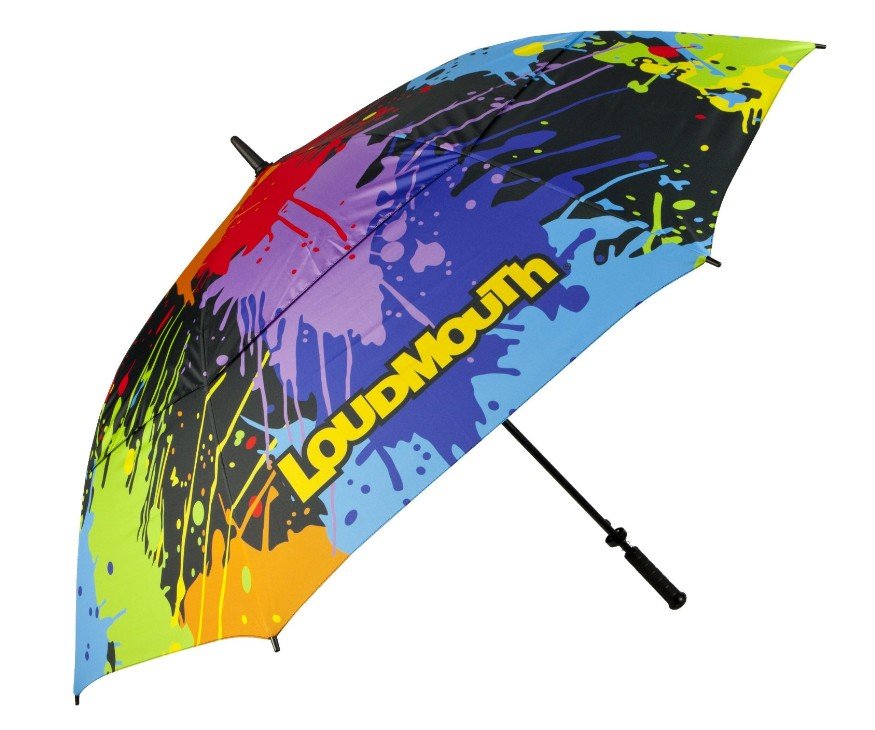
- Full-colour artwork, gradients, photos, or “full canopy wrap” designs
- Multiple designs in one order, subject to the MOQ for each selected umbrella style
- Variable data (names, codes, personalised images)
- Faster sampling and low setup cost (no printing plates)
Choose Screen Printing when your design is simple:
- 1–2 solid colours, a clean logo, and the same artwork across the entire batch
- You want the lowest possible unit cost for larger volumes
Practical tip: Many brands combine both—screen print the outside logo and digital print the inside art, depending on the umbrella structure.
1) Clarifying Two Terms: “Inside-Out Print” vs “Reverse Umbrella”
Buyers often mix these up, so here is the simple definition:
- Inside-Out Print: a printing approach—outside stays minimal and professional, inside carries the full-colour design.
- Reverse (Inverted) Umbrella: a product structure—an umbrella that closes “inward,” helping trap water and keep car interiors drier.
You can apply inside-out printing to many umbrella types (compact, stick, golf, double-canopy styles). Reverse umbrellas are one popular model where inside printing looks especially striking.
2) Why Inside Printing Feels Premium (and Sells Better)
A normal promotional umbrella is “logo on one panel.” A premium umbrella is an experience. Inside printing creates a surprise moment for the user—especially in grey weather.
3) The Power of Variable Data Printing (Names, Photos, Codes)
Most factories can print a logo. Variable data printing is different: you can produce a batch where every unit is unique—without making 1,000 screens. That unlocks new use cases: staff gifts, VIP campaigns, limited editions, fan clubs, and personalised corporate merch.
Where Variable Data Printing Works Best
Variable-data production can suit employee gifts, membership programmes, limited editions, event campaigns and projects that require a different name, image or QR code on each umbrella. Before production, the buyer should provide a structured file list, consistent artwork dimensions and clear naming rules. We then confirm the print sequence, colour expectations and approval process.
4) Where Quality Matters: Panel Alignment & Sewing Accuracy
Digital printing on umbrellas is not just “print quality.” The real challenge is alignment. An umbrella is made of triangular panels. If your image crosses seams (a skyline, a landscape, geometric lines), cutting and sewing must be consistent—or the visual breaks.
QC Our alignment-focused production approach
- Artwork planning: we identify seam-crossing areas early and recommend safe layouts if needed.
- Consistent cutting: controlled cutting tolerances to keep panel geometry stable.
- Experienced sewing: seam consistency is the difference between “premium” and “cheap.”
5) File Requirements (So Your Print Looks Expensive, Not Blurry)
If your file is low resolution, the final umbrella will look low resolution—no factory magic can fix that.
Files Recommended file specs for digital printing
- Format: AI / PDF (vector) for logos; TIFF/PSD/JPG for photos (high-res)
- Resolution: 200 DPI minimum at final print size (300 DPI recommended for premium art)
- Colour: CMYK preferred; Pantone reference accepted for brand colours (final result depends on fabric + ink profile)
- Variable data: provide a file list or CSV (Name / Code / Image filename) and consistent naming rules
6) MOQ & Lead Time: A Realistic Expectation
Digital printing removes plate costs, which makes small batches realistic. But “one-of-a-kind” still requires planning—especially if each unit is unique.
| Order Type | Best For | Typical Notes |
|---|---|---|
| Prototype (1–2 pcs) | Design validation | Used for fit, colour direction, and approval reference |
| Small batch (selected styles from 25 pcs/design) | New launches, limited editions | No plate costs; efficient for multiple designs |
| Bulk (500+ pcs) | Campaigns, retail programs | Best unit economics; can mix methods (screen + digital) if needed |
Note: Final MOQ and lead time depend on the umbrella model, fabric, printing coverage and packaging. Custom samples normally take 3–5 working days after specifications and artwork are confirmed. Bulk production normally takes 15–20 days after sample approval. For variable-data projects, we also confirm the file-list workflow before production.
Why Choose HF Umbrella for Digital Custom Orders?
- Small-batch friendly: prototypes and limited runs are welcome.
- Variable data capable: names, QR codes, unique images—built into our workflow.
- Premium positioning: inside print, full-wrap designs, and museum-grade art reproduction options.
Have a Complex Customization Idea?
Send your artwork (or a concept) and your target quantity. We’ll advise the best printing method and provide a clear production plan. Review our Pantone colour-matching guide, see the custom design and manufacturing process, or browse our umbrella case studies before sending your project brief. Request a Custom Printing Quote 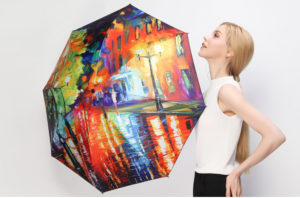
FAQ: Digital Printing & Variable Data Umbrellas
Is digital printing the same as dye sublimation?
In umbrella manufacturing, “digital printing” usually refers to dye sublimation on polyester-based umbrella fabrics. It enables full-colour, photo-quality results without screen plates.
What does “Inside-Out” printing mean?
It means the outside canopy stays minimal (often black or navy), while the inside panels carry the full-colour artwork. It feels premium and is more wearable for everyday users.
Is “Reverse (Inverted) Umbrella” required for inside printing?
No. Reverse umbrellas are one popular model, but inside printing can be applied to many umbrella types, including compact, stick, and golf umbrellas.
Can you make each umbrella different (names/photos/QR codes)?
Yes. Variable data printing allows each unit to be unique within one production run. We typically ask for a file list or CSV and clear naming rules for the artwork files.
What’s the MOQ for digital printing umbrellas?
Digital printing is low-MOQ friendly because there are no plate costs. Selected custom styles start from 25 pieces per design, while prototypes can be made for approval. The final MOQ depends on the model, printing coverage, number of designs and packaging.
What file format and resolution should I send?
For best results: AI/PDF vectors for logos and high-res TIFF/PSD/JPG for photos. Use at least 200 DPI at final size (300 DPI recommended for premium art reproduction).
Can you match Pantone colours with digital printing?
We can target Pantone references, but exact matching depends on fabric, ink profile, and coating. For strict brand programmes, we recommend a colour approval step (swatch or sample).
How do you avoid misalignment across umbrella panels?
Seam-crossing images require controlled cutting and consistent sewing. We review artwork early, recommend safe layouts if needed, and apply alignment-focused QC during production.
What’s a typical lead time?
A digital mock-up can normally be prepared before sampling. Custom samples normally take 3–5 working days after specifications and artwork are confirmed. Bulk production normally takes 15–20 days after sample approval, plus shipping time based on the destination and transport method.